> ## Documentation Index
> Fetch the complete documentation index at: https://docs.insforge.dev/llms.txt
> Use this file to discover all available pages before exploring further.
# Model Gateway
> Call any LLM through one InsForge-managed key, with per-project quotas.
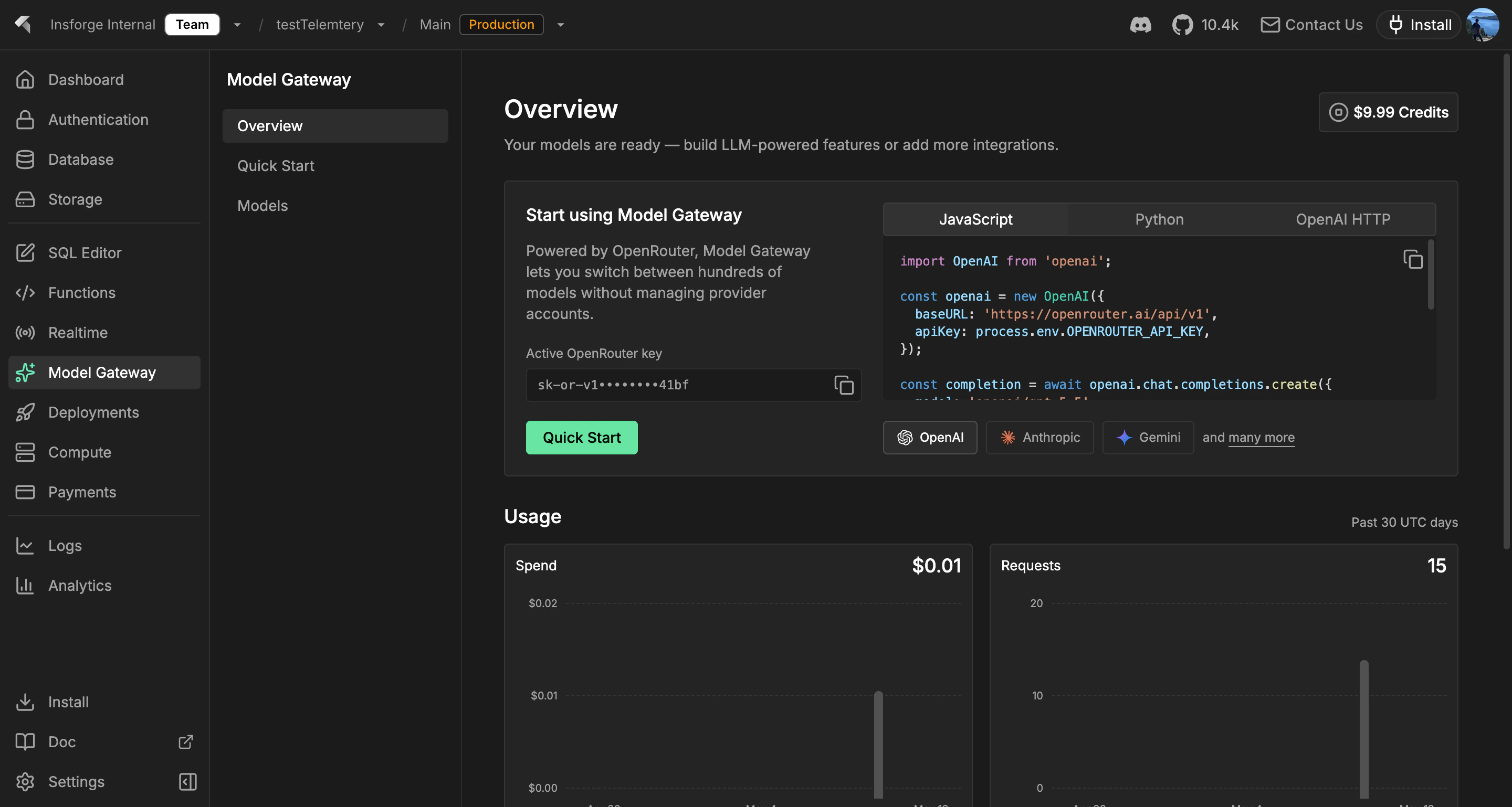
Use the Model Gateway to call chat, streaming, and embedding models through one OpenAI-compatible endpoint. InsForge holds the provider keys, tracks usage per project, and routes traffic through [OpenRouter](https://openrouter.ai), so your application code never sees Anthropic, OpenAI, or Mistral credentials directly.
 **Want to run AI code, not call a model?** Use [Edge Functions](/core-concepts/functions/overview) to orchestrate prompts, retrieval, and tools. The Model Gateway is the call; functions are the program around it.
```mermaid theme={null}
graph TB
Dashboard[InsForge Dashboard] --> Key[Active OpenRouter Key]
Dashboard --> Catalog[OpenRouter Model Catalog]
Dashboard --> Metrics[OpenRouter Usage Overview]
App[Application Backend or Server Route] --> SDK[OpenAI SDK]
SDK --> OpenRouter[OpenRouter API]
OpenRouter --> OpenAI[OpenAI]
OpenRouter --> Anthropic[Anthropic]
OpenRouter --> Google[Google]
OpenRouter --> More[Other Providers]
style Dashboard fill:#1e293b,stroke:#475569,color:#e2e8f0
style App fill:#166534,stroke:#22c55e,color:#dcfce7
style SDK fill:#1e40af,stroke:#3b82f6,color:#dbeafe
style OpenRouter fill:#c2410c,stroke:#fb923c,color:#fed7aa
```
## Features
### OpenAI-compatible API
Point any OpenAI SDK or `openai`-compatible library at `https://.insforge.dev/v1` and it works. `/v1/chat/completions`, `/v1/embeddings`, and `/v1/models` all behave like the upstream spec.
### Streaming
Server-sent events for chat completions. Use the streaming endpoint the same way you would with OpenAI; the gateway forwards tokens as they arrive from the provider.
### Embeddings
Generate dense vectors from any embedding model OpenRouter supports. Store the result in Postgres with [pgvector](/core-concepts/database/pgvector) for semantic search.
### Per-project quotas
Each project carries its own rate limit and spend cap. Hit it, and the gateway returns a clean 429 instead of leaking provider quota state into your app.
### Usage tracking
Every request is logged with model, token count, and cost. Query usage from the dashboard, CLI, or MCP — billing reconciles to OpenRouter's invoice automatically.
### Multi-provider routing
Switch between Anthropic, OpenAI, Mistral, Llama, Gemini, and dozens more by changing the model name in the request. Application code does not change.
## Build with it
Chat, stream, and embed from Node, browser, and edge runtimes.
Native Swift AI client for iOS and macOS.
Coroutines-first AI client for Android and JVM.
Plain HTTP AI endpoints, callable from any language.
## Next steps
* Set up the [CLI](/quickstart) to link your project (the recommended path).
* Browse the [TypeScript SDK reference](/sdks/typescript/ai) for chat and embedding patterns.
**Want to run AI code, not call a model?** Use [Edge Functions](/core-concepts/functions/overview) to orchestrate prompts, retrieval, and tools. The Model Gateway is the call; functions are the program around it.
```mermaid theme={null}
graph TB
Dashboard[InsForge Dashboard] --> Key[Active OpenRouter Key]
Dashboard --> Catalog[OpenRouter Model Catalog]
Dashboard --> Metrics[OpenRouter Usage Overview]
App[Application Backend or Server Route] --> SDK[OpenAI SDK]
SDK --> OpenRouter[OpenRouter API]
OpenRouter --> OpenAI[OpenAI]
OpenRouter --> Anthropic[Anthropic]
OpenRouter --> Google[Google]
OpenRouter --> More[Other Providers]
style Dashboard fill:#1e293b,stroke:#475569,color:#e2e8f0
style App fill:#166534,stroke:#22c55e,color:#dcfce7
style SDK fill:#1e40af,stroke:#3b82f6,color:#dbeafe
style OpenRouter fill:#c2410c,stroke:#fb923c,color:#fed7aa
```
## Features
### OpenAI-compatible API
Point any OpenAI SDK or `openai`-compatible library at `https://.insforge.dev/v1` and it works. `/v1/chat/completions`, `/v1/embeddings`, and `/v1/models` all behave like the upstream spec.
### Streaming
Server-sent events for chat completions. Use the streaming endpoint the same way you would with OpenAI; the gateway forwards tokens as they arrive from the provider.
### Embeddings
Generate dense vectors from any embedding model OpenRouter supports. Store the result in Postgres with [pgvector](/core-concepts/database/pgvector) for semantic search.
### Per-project quotas
Each project carries its own rate limit and spend cap. Hit it, and the gateway returns a clean 429 instead of leaking provider quota state into your app.
### Usage tracking
Every request is logged with model, token count, and cost. Query usage from the dashboard, CLI, or MCP — billing reconciles to OpenRouter's invoice automatically.
### Multi-provider routing
Switch between Anthropic, OpenAI, Mistral, Llama, Gemini, and dozens more by changing the model name in the request. Application code does not change.
## Build with it
Chat, stream, and embed from Node, browser, and edge runtimes.
Native Swift AI client for iOS and macOS.
Coroutines-first AI client for Android and JVM.
Plain HTTP AI endpoints, callable from any language.
## Next steps
* Set up the [CLI](/quickstart) to link your project (the recommended path).
* Browse the [TypeScript SDK reference](/sdks/typescript/ai) for chat and embedding patterns.