> ## Documentation Index
> Fetch the complete documentation index at: https://docs.insforge.dev/llms.txt
> Use this file to discover all available pages before exploring further.
# Authentication
> Use InsForge to authenticate and authorize your users.
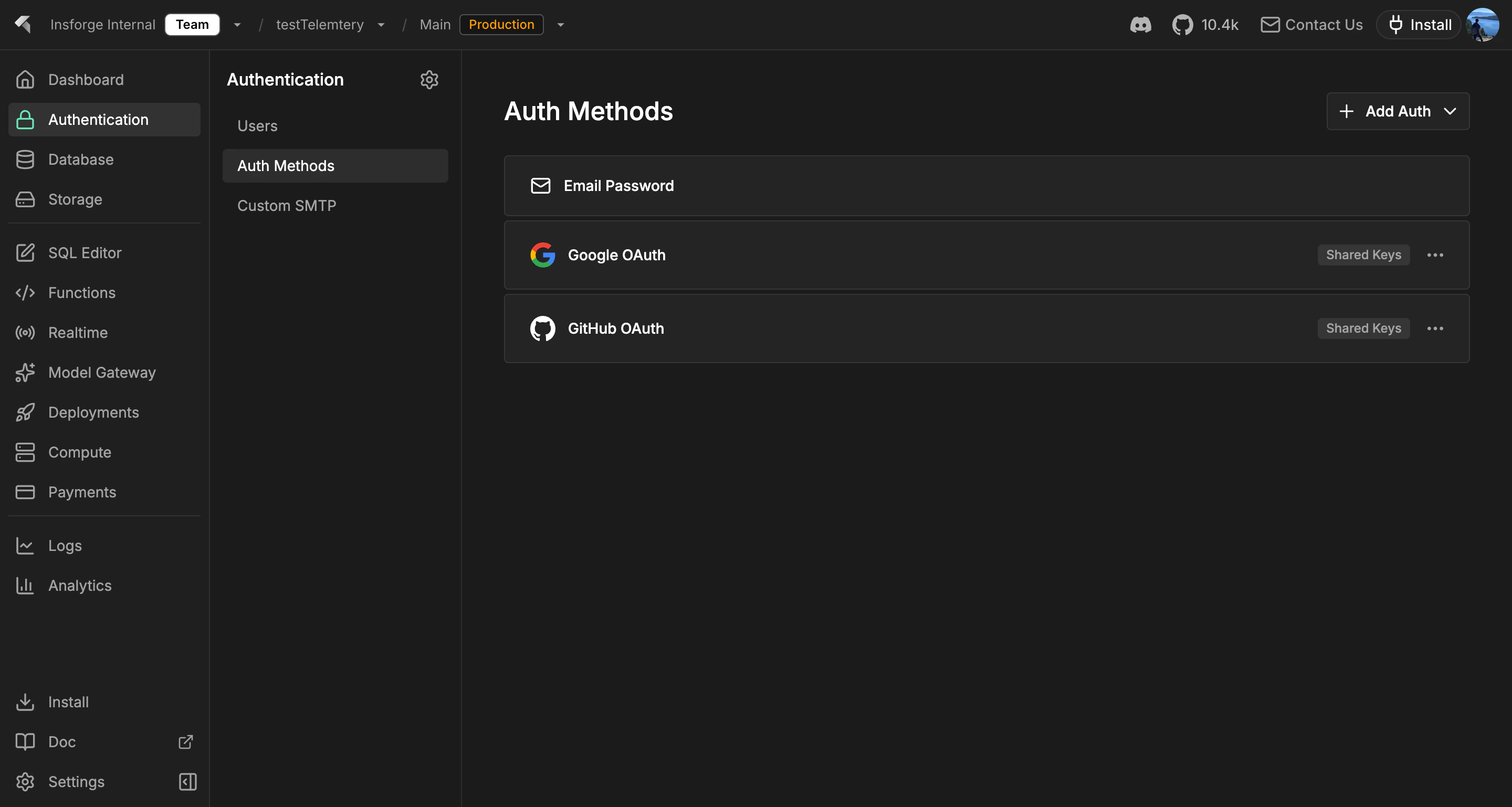
Use InsForge Authentication to handle sign-up, login, sessions, and identity for your app. Users can sign in with email and password, magic link, one-time code, OAuth providers (Google, GitHub, Apple, and others), or any OIDC-compliant identity provider you bring. InsForge issues JSON Web Tokens on login, and every other product on the platform consumes the same token.
 **Authentication** is checking that a user is who they say they are. **Authorization** is checking what they can do. InsForge handles the first directly and powers the second through [row-level security](/core-concepts/database/overview) policies that read the auth JWT.
```mermaid theme={null}
graph TB
Client[Client Application] --> SDK[InsForge SDK]
SDK --> AuthAPI[Auth API]
AuthAPI --> JWT[JWT Service]
AuthAPI --> OAuth[OAuth Providers]
AuthAPI --> DB[(PostgreSQL)]
OAuth --> Google[Google OAuth 2.0]
OAuth --> GitHub[GitHub OAuth]
JWT --> Secret[Shared Secret]
JWT --> Validation[Token Validation]
DB --> Users[auth.users Table]
DB --> Providers[auth.user_providers]
style Client fill:#1e293b,stroke:#475569,color:#e2e8f0
style SDK fill:#1e40af,stroke:#3b82f6,color:#dbeafe
style AuthAPI fill:#166534,stroke:#22c55e,color:#dcfce7
style JWT fill:#c2410c,stroke:#fb923c,color:#fed7aa
style OAuth fill:#6b21a8,stroke:#a855f7,color:#f3e8ff
style DB fill:#0e7490,stroke:#06b6d4,color:#cffafe
style Secret fill:#991b1b,stroke:#ef4444,color:#fee2e2
style Google fill:#4c1d95,stroke:#8b5cf6,color:#ede9fe
style GitHub fill:#1e293b,stroke:#64748b,color:#f1f5f9
style Validation fill:#991b1b,stroke:#ef4444,color:#fee2e2
style Users fill:#0e7490,stroke:#22d3ee,color:#cffafe
style Providers fill:#0e7490,stroke:#22d3ee,color:#cffafe
```
## Features
### Email and password
The default. New users sign up with an email and password, get a confirmation email, and receive a session JWT on login. Password reset, email verification, and brute-force throttling are built in.
### Magic link and OTP
Send a one-time link or six-digit code to the user's email. Passwordless sign-in, account recovery, and step-up auth all use the same primitive.
### OAuth providers
First-class support for Google, GitHub, Apple, Microsoft, GitLab, Discord, and more. Add custom OAuth 2.0 / OIDC providers (Keycloak, Okta, Auth0, your own IdP) by URL without writing provider-specific code.
### OAuth server mode
Run InsForge itself as an OAuth 2.0 / OIDC identity provider for your own downstream apps. See the [OAuth Server guide](/oauth-server) for the full setup.
### Row-level security
The auth JWT flows through every InsForge SDK call automatically. Postgres RLS policies read claims from the token and decide, row by row, what the user can read and write. The same identity and the same policies apply whether the request hits the database, storage, or a realtime channel.
### `auth.users` in your database
User state lives in your project's Postgres database in the `auth` schema. Join `auth.users` to your application tables via foreign keys, react to identity changes with triggers, and back the whole thing up the same way you back up everything else.
## Build with it
Sign up, log in, and manage sessions from Node, browser, and edge.
Native Swift auth client for iOS and macOS.
Coroutines-first auth client for Android and JVM.
Plain HTTP auth endpoints, callable from any language.
## Next steps
* Set up the [CLI](/quickstart) to link your project (the recommended path).
* Browse the [TypeScript SDK reference](/sdks/typescript/auth) for sign-in patterns.
**Authentication** is checking that a user is who they say they are. **Authorization** is checking what they can do. InsForge handles the first directly and powers the second through [row-level security](/core-concepts/database/overview) policies that read the auth JWT.
```mermaid theme={null}
graph TB
Client[Client Application] --> SDK[InsForge SDK]
SDK --> AuthAPI[Auth API]
AuthAPI --> JWT[JWT Service]
AuthAPI --> OAuth[OAuth Providers]
AuthAPI --> DB[(PostgreSQL)]
OAuth --> Google[Google OAuth 2.0]
OAuth --> GitHub[GitHub OAuth]
JWT --> Secret[Shared Secret]
JWT --> Validation[Token Validation]
DB --> Users[auth.users Table]
DB --> Providers[auth.user_providers]
style Client fill:#1e293b,stroke:#475569,color:#e2e8f0
style SDK fill:#1e40af,stroke:#3b82f6,color:#dbeafe
style AuthAPI fill:#166534,stroke:#22c55e,color:#dcfce7
style JWT fill:#c2410c,stroke:#fb923c,color:#fed7aa
style OAuth fill:#6b21a8,stroke:#a855f7,color:#f3e8ff
style DB fill:#0e7490,stroke:#06b6d4,color:#cffafe
style Secret fill:#991b1b,stroke:#ef4444,color:#fee2e2
style Google fill:#4c1d95,stroke:#8b5cf6,color:#ede9fe
style GitHub fill:#1e293b,stroke:#64748b,color:#f1f5f9
style Validation fill:#991b1b,stroke:#ef4444,color:#fee2e2
style Users fill:#0e7490,stroke:#22d3ee,color:#cffafe
style Providers fill:#0e7490,stroke:#22d3ee,color:#cffafe
```
## Features
### Email and password
The default. New users sign up with an email and password, get a confirmation email, and receive a session JWT on login. Password reset, email verification, and brute-force throttling are built in.
### Magic link and OTP
Send a one-time link or six-digit code to the user's email. Passwordless sign-in, account recovery, and step-up auth all use the same primitive.
### OAuth providers
First-class support for Google, GitHub, Apple, Microsoft, GitLab, Discord, and more. Add custom OAuth 2.0 / OIDC providers (Keycloak, Okta, Auth0, your own IdP) by URL without writing provider-specific code.
### OAuth server mode
Run InsForge itself as an OAuth 2.0 / OIDC identity provider for your own downstream apps. See the [OAuth Server guide](/oauth-server) for the full setup.
### Row-level security
The auth JWT flows through every InsForge SDK call automatically. Postgres RLS policies read claims from the token and decide, row by row, what the user can read and write. The same identity and the same policies apply whether the request hits the database, storage, or a realtime channel.
### `auth.users` in your database
User state lives in your project's Postgres database in the `auth` schema. Join `auth.users` to your application tables via foreign keys, react to identity changes with triggers, and back the whole thing up the same way you back up everything else.
## Build with it
Sign up, log in, and manage sessions from Node, browser, and edge.
Native Swift auth client for iOS and macOS.
Coroutines-first auth client for Android and JVM.
Plain HTTP auth endpoints, callable from any language.
## Next steps
* Set up the [CLI](/quickstart) to link your project (the recommended path).
* Browse the [TypeScript SDK reference](/sdks/typescript/auth) for sign-in patterns.