> ## Documentation Index
> Fetch the complete documentation index at: https://docs.insforge.dev/llms.txt
> Use this file to discover all available pages before exploring further.
# Realtime
> Send database changes, broadcasts, presence, and webhook fan-out through realtime channels.
Use InsForge Realtime when your app needs to update without a page refresh. Clients subscribe to channels such as `order:123` or `chat:room-1`, then receive database changes, broadcasts, and presence updates over WebSockets. Channels can also fan out the same messages to webhook URLs when another service should receive the event.
 **Need server-side code to run after a database change?** Put that business logic in an [Edge Function](/core-concepts/functions/overview) and invoke it from a database trigger. Use Realtime when the change should be delivered to connected clients or configured webhook endpoints.
```mermaid theme={null}
graph TB
App[Client application] --> SDK[InsForge SDK]
SDK --> Channel[Realtime channel]
Database[(Postgres)] --> Trigger[Database trigger]
Trigger --> Channel
Channel --> WebSocket[WebSocket subscribers]
Channel --> Presence[Presence state]
Channel --> Webhook[Webhook URLs]
Channel --> History[(Message history)]
Auth[Auth token and RLS] --> Channel
style App fill:#1e293b,stroke:#475569,color:#e2e8f0
style SDK fill:#1e40af,stroke:#3b82f6,color:#dbeafe
style Channel fill:#166534,stroke:#22c55e,color:#dcfce7
style Database fill:#0e7490,stroke:#06b6d4,color:#cffafe
style Trigger fill:#4c1d95,stroke:#8b5cf6,color:#ede9fe
style WebSocket fill:#c2410c,stroke:#fb923c,color:#fed7aa
style Presence fill:#c2410c,stroke:#fb923c,color:#fed7aa
style Webhook fill:#c2410c,stroke:#fb923c,color:#fed7aa
style History fill:#0e7490,stroke:#06b6d4,color:#cffafe
style Auth fill:#4c1d95,stroke:#8b5cf6,color:#ede9fe
```
## Features
### Channels
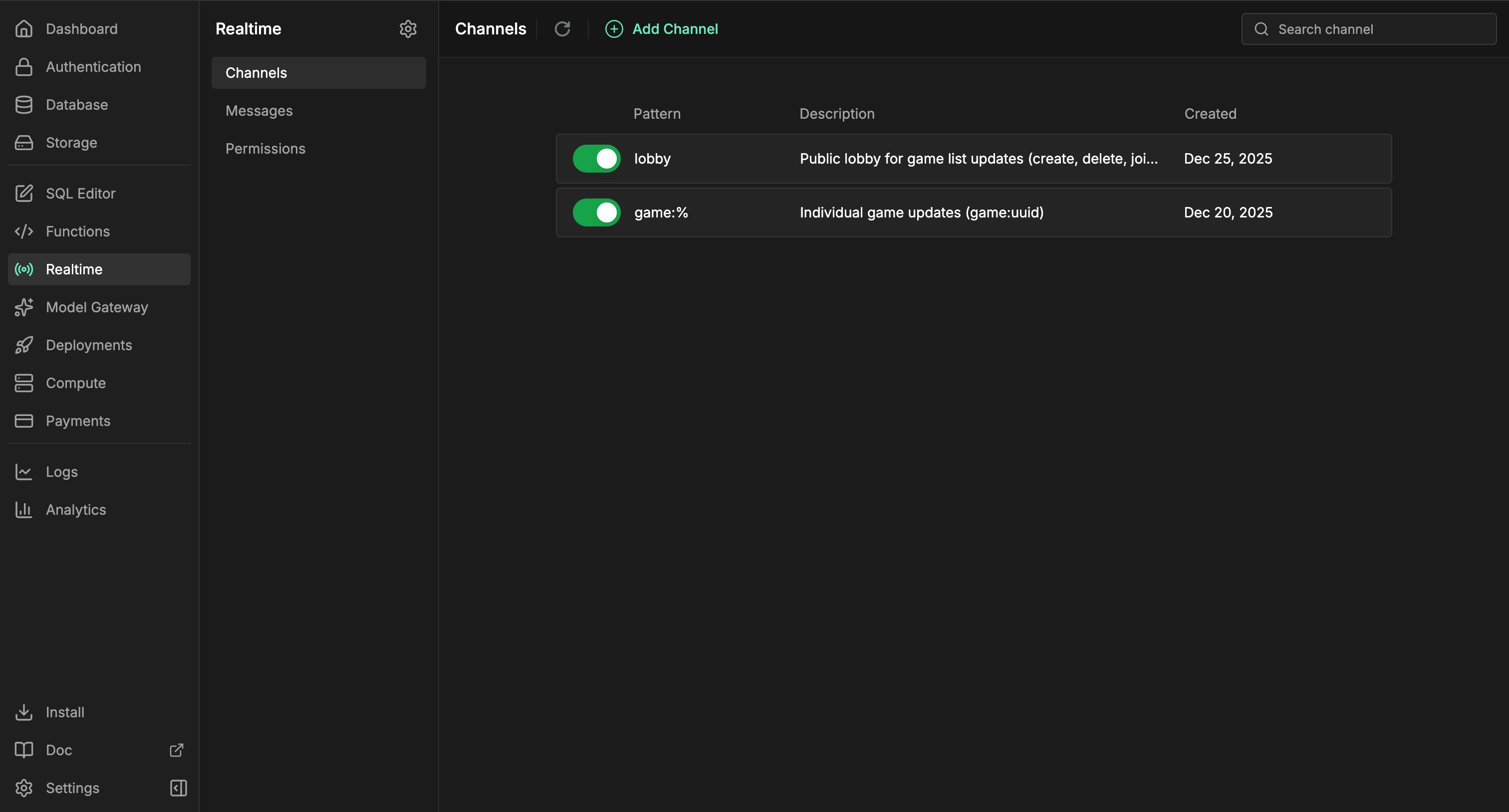
Channels are named topics that clients can join. Use exact names for shared rooms, or patterns like `order:%` when every record needs its own live stream.
### Database changes
Use database changes when a table write should become a live app event. Create a trigger on the table you want to watch. In its trigger function, call the predefined `realtime.publish(channel, event, payload)` function to decide which channel receives the message, which event name clients handle, and what payload they receive.
For a channel pattern such as `order:%`, a trigger can publish one event per order:
```sql theme={null}
CREATE OR REPLACE FUNCTION public.notify_order_status()
RETURNS TRIGGER AS $$
BEGIN
PERFORM realtime.publish(
'order:' || NEW.id::text,
'status_changed',
jsonb_build_object(
'id', NEW.id,
'status', NEW.status,
'updatedAt', NEW.updated_at
)
);
RETURN NEW;
END;
$$ LANGUAGE plpgsql SECURITY DEFINER;
CREATE TRIGGER order_status_realtime
AFTER UPDATE OF status ON public.orders
FOR EACH ROW
WHEN (OLD.status IS DISTINCT FROM NEW.status)
EXECUTE FUNCTION public.notify_order_status();
```
Then subscribe from the app with the SDK:
```typescript theme={null}
const channel = `order:${orderId}`;
await insforge.realtime.connect();
const subscription = await insforge.realtime.subscribe(channel);
if (!subscription.ok) {
throw new Error(subscription.error.message);
}
insforge.realtime.on('status_changed', (message) => {
renderOrderStatus(message.status);
});
```
### Client broadcasts
Clients can publish messages to channels they have already joined. Use this for chat, typing indicators, cursors, collaborative editing signals, and other user-to-user updates that do not need to start from a database write.
```typescript theme={null}
await insforge.realtime.publish(`chat:${roomId}`, 'typing', {
userId,
isTyping: true
});
```
### Webhooks
Attach webhook URLs to a channel when another service should receive each message. InsForge posts the event payload to every configured URL, includes headers for the event name, channel, and message ID, retries transient network failures, and records webhook delivery counts in message history.
### Presence
Presence tracks who is online in a channel. Clients receive the current member snapshot when they subscribe, then `presence:join` and `presence:leave` events as members come and go. Store durable room membership, roles, and permissions in your own tables; presence is only online state.
```typescript theme={null}
const response = await insforge.realtime.subscribe(`chat:${roomId}`);
if (response.ok) {
renderOnlineMembers(response.presence.members);
}
insforge.realtime.on('presence:join', (message) => {
addOnlineMember(message.member);
});
insforge.realtime.on('presence:leave', (message) => {
removeOnlineMember(message.member.presenceId);
});
```
### Row-level security
Realtime can be open while prototyping, then locked down with Postgres RLS. Use `SELECT` policies on `realtime.channels` to control who can subscribe, and `INSERT` policies on `realtime.messages` to control who can publish from a client.
This policy lets authenticated users subscribe to `order:` channels only when the order belongs to them:
```sql theme={null}
ALTER TABLE realtime.channels ENABLE ROW LEVEL SECURITY;
CREATE POLICY "users_subscribe_own_orders"
ON realtime.channels
FOR SELECT
TO authenticated
USING (
pattern = 'order:%'
AND EXISTS (
SELECT 1
FROM public.orders
WHERE id = NULLIF(split_part(realtime.channel_name(), ':', 2), '')::uuid
AND user_id = auth.uid()
)
);
```
Use `realtime.channel_name()` in subscribe policies because clients subscribe to resolved channels such as `order:123`, while `realtime.channels` stores patterns such as `order:%`.
### Message history
Every delivered event is recorded with WebSocket and webhook delivery counts. The dashboard can inspect recent messages, delivery stats, and retention settings when you need to debug live behavior.
## Build with it
Subscribe to channels, publish events, and track presence from Node, browser, and edge.
Native Swift realtime client for iOS and macOS.
Coroutines-first realtime client for Android and JVM.
Use the raw Socket.IO contract from any language.
## Next steps
* Set up the [CLI](/quickstart) to link your project.
* Create channels in the Realtime dashboard.
* Use the [TypeScript SDK reference](/sdks/typescript/realtime) for client subscriptions.
* Add webhook URLs to a channel when another service needs the same event stream.
**Need server-side code to run after a database change?** Put that business logic in an [Edge Function](/core-concepts/functions/overview) and invoke it from a database trigger. Use Realtime when the change should be delivered to connected clients or configured webhook endpoints.
```mermaid theme={null}
graph TB
App[Client application] --> SDK[InsForge SDK]
SDK --> Channel[Realtime channel]
Database[(Postgres)] --> Trigger[Database trigger]
Trigger --> Channel
Channel --> WebSocket[WebSocket subscribers]
Channel --> Presence[Presence state]
Channel --> Webhook[Webhook URLs]
Channel --> History[(Message history)]
Auth[Auth token and RLS] --> Channel
style App fill:#1e293b,stroke:#475569,color:#e2e8f0
style SDK fill:#1e40af,stroke:#3b82f6,color:#dbeafe
style Channel fill:#166534,stroke:#22c55e,color:#dcfce7
style Database fill:#0e7490,stroke:#06b6d4,color:#cffafe
style Trigger fill:#4c1d95,stroke:#8b5cf6,color:#ede9fe
style WebSocket fill:#c2410c,stroke:#fb923c,color:#fed7aa
style Presence fill:#c2410c,stroke:#fb923c,color:#fed7aa
style Webhook fill:#c2410c,stroke:#fb923c,color:#fed7aa
style History fill:#0e7490,stroke:#06b6d4,color:#cffafe
style Auth fill:#4c1d95,stroke:#8b5cf6,color:#ede9fe
```
## Features
### Channels
Channels are named topics that clients can join. Use exact names for shared rooms, or patterns like `order:%` when every record needs its own live stream.
### Database changes
Use database changes when a table write should become a live app event. Create a trigger on the table you want to watch. In its trigger function, call the predefined `realtime.publish(channel, event, payload)` function to decide which channel receives the message, which event name clients handle, and what payload they receive.
For a channel pattern such as `order:%`, a trigger can publish one event per order:
```sql theme={null}
CREATE OR REPLACE FUNCTION public.notify_order_status()
RETURNS TRIGGER AS $$
BEGIN
PERFORM realtime.publish(
'order:' || NEW.id::text,
'status_changed',
jsonb_build_object(
'id', NEW.id,
'status', NEW.status,
'updatedAt', NEW.updated_at
)
);
RETURN NEW;
END;
$$ LANGUAGE plpgsql SECURITY DEFINER;
CREATE TRIGGER order_status_realtime
AFTER UPDATE OF status ON public.orders
FOR EACH ROW
WHEN (OLD.status IS DISTINCT FROM NEW.status)
EXECUTE FUNCTION public.notify_order_status();
```
Then subscribe from the app with the SDK:
```typescript theme={null}
const channel = `order:${orderId}`;
await insforge.realtime.connect();
const subscription = await insforge.realtime.subscribe(channel);
if (!subscription.ok) {
throw new Error(subscription.error.message);
}
insforge.realtime.on('status_changed', (message) => {
renderOrderStatus(message.status);
});
```
### Client broadcasts
Clients can publish messages to channels they have already joined. Use this for chat, typing indicators, cursors, collaborative editing signals, and other user-to-user updates that do not need to start from a database write.
```typescript theme={null}
await insforge.realtime.publish(`chat:${roomId}`, 'typing', {
userId,
isTyping: true
});
```
### Webhooks
Attach webhook URLs to a channel when another service should receive each message. InsForge posts the event payload to every configured URL, includes headers for the event name, channel, and message ID, retries transient network failures, and records webhook delivery counts in message history.
### Presence
Presence tracks who is online in a channel. Clients receive the current member snapshot when they subscribe, then `presence:join` and `presence:leave` events as members come and go. Store durable room membership, roles, and permissions in your own tables; presence is only online state.
```typescript theme={null}
const response = await insforge.realtime.subscribe(`chat:${roomId}`);
if (response.ok) {
renderOnlineMembers(response.presence.members);
}
insforge.realtime.on('presence:join', (message) => {
addOnlineMember(message.member);
});
insforge.realtime.on('presence:leave', (message) => {
removeOnlineMember(message.member.presenceId);
});
```
### Row-level security
Realtime can be open while prototyping, then locked down with Postgres RLS. Use `SELECT` policies on `realtime.channels` to control who can subscribe, and `INSERT` policies on `realtime.messages` to control who can publish from a client.
This policy lets authenticated users subscribe to `order:` channels only when the order belongs to them:
```sql theme={null}
ALTER TABLE realtime.channels ENABLE ROW LEVEL SECURITY;
CREATE POLICY "users_subscribe_own_orders"
ON realtime.channels
FOR SELECT
TO authenticated
USING (
pattern = 'order:%'
AND EXISTS (
SELECT 1
FROM public.orders
WHERE id = NULLIF(split_part(realtime.channel_name(), ':', 2), '')::uuid
AND user_id = auth.uid()
)
);
```
Use `realtime.channel_name()` in subscribe policies because clients subscribe to resolved channels such as `order:123`, while `realtime.channels` stores patterns such as `order:%`.
### Message history
Every delivered event is recorded with WebSocket and webhook delivery counts. The dashboard can inspect recent messages, delivery stats, and retention settings when you need to debug live behavior.
## Build with it
Subscribe to channels, publish events, and track presence from Node, browser, and edge.
Native Swift realtime client for iOS and macOS.
Coroutines-first realtime client for Android and JVM.
Use the raw Socket.IO contract from any language.
## Next steps
* Set up the [CLI](/quickstart) to link your project.
* Create channels in the Realtime dashboard.
* Use the [TypeScript SDK reference](/sdks/typescript/realtime) for client subscriptions.
* Add webhook URLs to a channel when another service needs the same event stream.