> ## Documentation Index
> Fetch the complete documentation index at: https://docs.insforge.dev/llms.txt
> Use this file to discover all available pages before exploring further.
# Sites
> Deploy frontend apps from your project, powered by Vercel.
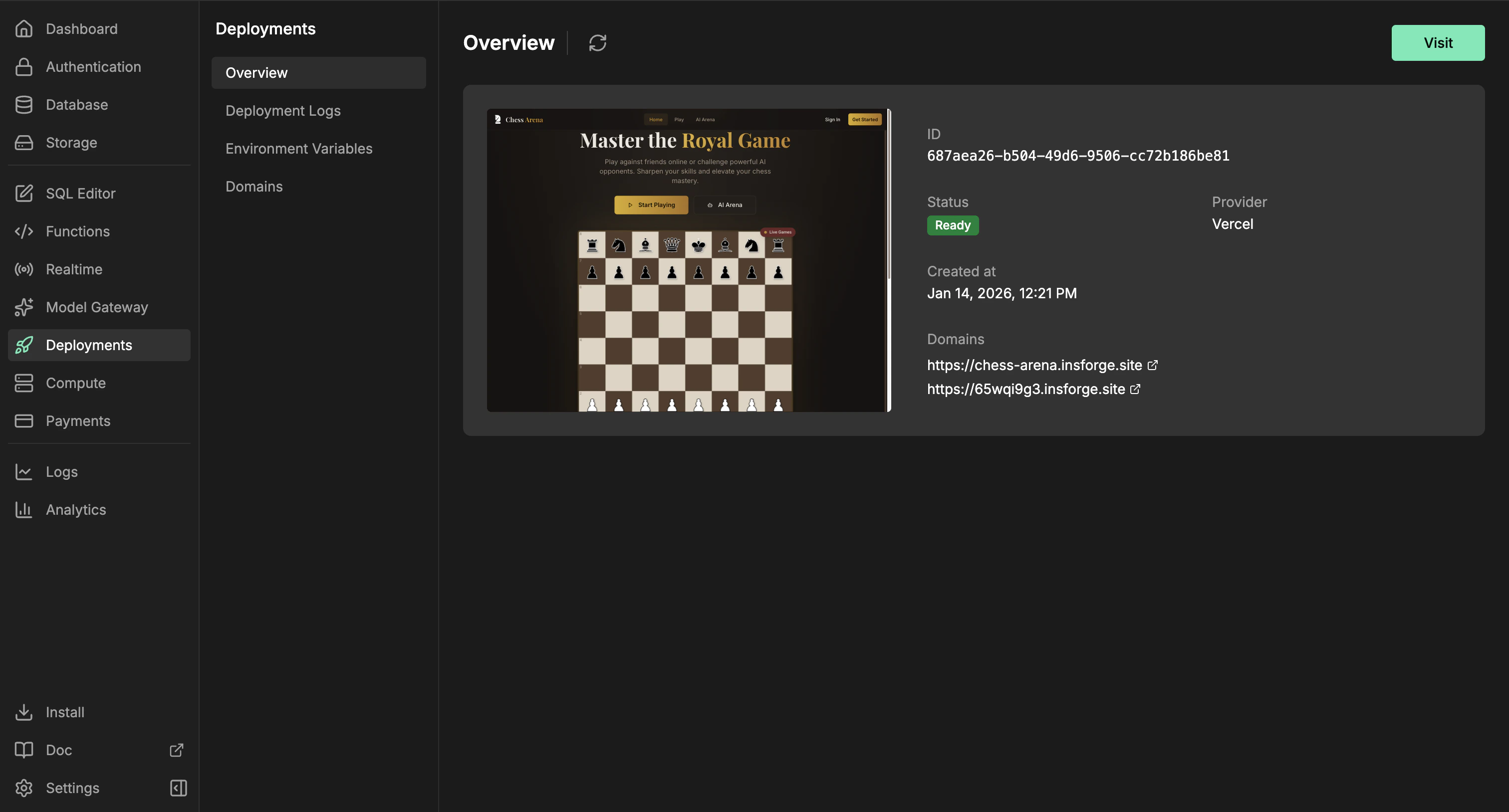
Use InsForge Sites to ship the browser-facing app that belongs to your project. The InsForge CLI uploads your frontend source through InsForge, which creates a Vercel production deployment. The dashboard tracks the URL, status, deployment history, environment variables, and domains.
 **Need to deploy a container or backend service?** Use [Compute](/core-concepts/compute/overview) for workers, queues, WebSocket servers, and long-running services. Sites are for frontend websites and framework builds that produce a hosted web app.
```mermaid theme={null}
flowchart TB
CLI[InsForge CLI] --> API[InsForge deployment API]
Dashboard[Dashboard] --> API
API --> Source[Frontend source upload]
API --> Config[Environment variables and domains]
Source --> Vercel[Vercel production build]
Config --> Vercel
Vercel --> App[Frontend app]
App --> URL[Public URL]
App --> Status[Status and deployment history]
style CLI fill:#1e293b,stroke:#475569,color:#e2e8f0
style Dashboard fill:#1e293b,stroke:#475569,color:#e2e8f0
style API fill:#166534,stroke:#22c55e,color:#dcfce7
style Source fill:#0e7490,stroke:#06b6d4,color:#cffafe
style Config fill:#4c1d95,stroke:#8b5cf6,color:#ede9fe
style Vercel fill:#c2410c,stroke:#fb923c,color:#fed7aa
style App fill:#166534,stroke:#22c55e,color:#dcfce7
style URL fill:#166534,stroke:#22c55e,color:#dcfce7
style Status fill:#4c1d95,stroke:#8b5cf6,color:#ede9fe
```
## Features
### CLI deploys
Deploy from your app's source directory. The CLI uploads the source tree, skips local-only files such as `node_modules`, `.git`, build output, and `.env` files, then starts the Vercel build through InsForge.
```bash theme={null}
npx @insforge/cli deployments deploy ./frontend
```
### Framework builds
Deploy React, Vue, Svelte, Next.js, static sites, and other frontend projects. InsForge sends the source files to Vercel, where framework detection and project files such as `package.json` and `vercel.json` decide how the app builds.
### Environment variables
Manage provider environment variables from the dashboard. Use public prefixes such as `VITE_` or `NEXT_PUBLIC_` only for values that are safe to expose in browser code.
```bash theme={null}
npx @insforge/cli deployments env list
npx @insforge/cli deployments env set VITE_INSFORGE_URL https://your-project.region.insforge.app
npx @insforge/cli deployments env set VITE_INSFORGE_ANON_KEY ik_xxx
```
### Deployment history
Review previous runs, sync Vercel status, inspect metadata, and cancel in-progress deployments from the Deployment Logs page.
```bash theme={null}
npx @insforge/cli deployments list
npx @insforge/cli deployments status deployment_123 --sync
npx @insforge/cli deployments cancel deployment_123
```
### Domains
Every ready deployment gets a default URL at `https://.insforge.site`. You can also set an InsForge-managed slug at `https://.insforge.site`. For a custom domain, add the domain in the dashboard and configure the DNS record it returns, usually a CNAME for subdomains.
## Deploy with it
Connect your project and run InsForge CLI commands from your app directory.
## Next steps
* Set up the [CLI](/quickstart) and connect your project.
* Add browser-safe environment variables from the dashboard or with `npx @insforge/cli deployments env set`.
* Run `npx @insforge/cli deployments deploy ./frontend`.
**Need to deploy a container or backend service?** Use [Compute](/core-concepts/compute/overview) for workers, queues, WebSocket servers, and long-running services. Sites are for frontend websites and framework builds that produce a hosted web app.
```mermaid theme={null}
flowchart TB
CLI[InsForge CLI] --> API[InsForge deployment API]
Dashboard[Dashboard] --> API
API --> Source[Frontend source upload]
API --> Config[Environment variables and domains]
Source --> Vercel[Vercel production build]
Config --> Vercel
Vercel --> App[Frontend app]
App --> URL[Public URL]
App --> Status[Status and deployment history]
style CLI fill:#1e293b,stroke:#475569,color:#e2e8f0
style Dashboard fill:#1e293b,stroke:#475569,color:#e2e8f0
style API fill:#166534,stroke:#22c55e,color:#dcfce7
style Source fill:#0e7490,stroke:#06b6d4,color:#cffafe
style Config fill:#4c1d95,stroke:#8b5cf6,color:#ede9fe
style Vercel fill:#c2410c,stroke:#fb923c,color:#fed7aa
style App fill:#166534,stroke:#22c55e,color:#dcfce7
style URL fill:#166534,stroke:#22c55e,color:#dcfce7
style Status fill:#4c1d95,stroke:#8b5cf6,color:#ede9fe
```
## Features
### CLI deploys
Deploy from your app's source directory. The CLI uploads the source tree, skips local-only files such as `node_modules`, `.git`, build output, and `.env` files, then starts the Vercel build through InsForge.
```bash theme={null}
npx @insforge/cli deployments deploy ./frontend
```
### Framework builds
Deploy React, Vue, Svelte, Next.js, static sites, and other frontend projects. InsForge sends the source files to Vercel, where framework detection and project files such as `package.json` and `vercel.json` decide how the app builds.
### Environment variables
Manage provider environment variables from the dashboard. Use public prefixes such as `VITE_` or `NEXT_PUBLIC_` only for values that are safe to expose in browser code.
```bash theme={null}
npx @insforge/cli deployments env list
npx @insforge/cli deployments env set VITE_INSFORGE_URL https://your-project.region.insforge.app
npx @insforge/cli deployments env set VITE_INSFORGE_ANON_KEY ik_xxx
```
### Deployment history
Review previous runs, sync Vercel status, inspect metadata, and cancel in-progress deployments from the Deployment Logs page.
```bash theme={null}
npx @insforge/cli deployments list
npx @insforge/cli deployments status deployment_123 --sync
npx @insforge/cli deployments cancel deployment_123
```
### Domains
Every ready deployment gets a default URL at `https://.insforge.site`. You can also set an InsForge-managed slug at `https://.insforge.site`. For a custom domain, add the domain in the dashboard and configure the DNS record it returns, usually a CNAME for subdomains.
## Deploy with it
Connect your project and run InsForge CLI commands from your app directory.
## Next steps
* Set up the [CLI](/quickstart) and connect your project.
* Add browser-safe environment variables from the dashboard or with `npx @insforge/cli deployments env set`.
* Run `npx @insforge/cli deployments deploy ./frontend`.